SOFTWARE COMPARISON GUIDE

Position Management vs. Succession Planning Software

Position management and succession planning are closely connected, but serve different purposes. While position management focuses on organizational structure, staffing needs, and vacancies, succession planning focuses on identifying critical roles, assessing successor readiness, and preparing future leaders.

Explore how position management software compares to purpose-built succession planning software, including key capabilities, benefits, and when to use them together.


WHERE POSITION MANAGEMENT SOFTWARE ADDS VALUE
Position creation and management — Create, define, modify, and maintain positions within the organization's workforce structure.
Position management
White checkmark symbol inside a gray circle.
Succession planning
Different focus
Organizational structure and reporting — Manage position hierarchies, departments, reporting relationships, and organizational charts.
Position management
White checkmark symbol inside a gray circle.
Succession planning
Different focus
Headcount and vacancy tracking — Monitor authorized positions, filled and vacant positions, and staffing requirements across the organization.
Position management
White checkmark symbol inside a gray circle.
Succession planning
Different focus
Position budgeting and cost control — Align approved positions with workforce budgets, compensation structures, and financial planning.
Position management
White checkmark symbol inside a gray circle.
Succession planning
Different focus
Workforce allocation — Manage how positions are distributed across departments, locations, and business units.
Position management
White checkmark symbol inside a gray circle.
Succession planning
Different focus
Position approvals and changes — Support workflows for creating, modifying, approving, or eliminating positions.
Position management
White checkmark symbol inside a gray circle.
Succession planning
Different focus
WHERE SUCCESSION PLANNING SOFTWARE ADDS VALUE
Key role and successor management — Identify critical positions and maintain succession plans with potential successors for each role.
Position mangement
—
Succession planning
White checkmark symbol centered within a solid blue circle.
Leadership risk visibility — Identify roles without adequate succession coverage or ready successors before vacancies occur.
Position mangement
—
Succession planning
White checkmark symbol centered within a solid blue circle.
Successor readiness tracking — Assess how prepared candidates are for future roles and monitor their progression over time.
Position mangement
—
Succession planning
White checkmark symbol centered within a solid blue circle.
Candidate development management — Identify development needs for future roles, assign activities, and track progress toward readiness.
Position mangement
—
Succession planning
White checkmark symbol centered within a solid blue circle.
Talent intelligence and discovery — Use skills, competencies, performance-potential grids, and talent insights to identify and evaluate future leaders.
Position mangement
—
Succession planning
White checkmark symbol centered within a solid blue circle.
HR and business leader collaboration — Engage Key Role Owners in identifying potential successors, evaluating readiness, and maintaining succession plans.
Position mangement
—
Succession planning
White checkmark symbol centered within a solid blue circle.
Measuring succession outcomes — Track internal promotions, readiness progression, and leadership development effectiveness.
Position mangement
—
Succession planning
White checkmark symbol centered within a solid blue circle.
Executive succession reporting — Access insights into leadership risk, bench strength, successor coverage, and development progress.
Position mangement
—
Succession planning
White checkmark symbol centered within a solid blue circle.
Succession planning workflows — Streamline reminders, surveys, follow-ups, and ongoing succession planning activities.
Position mangement
—
Succession planning
White checkmark symbol centered within a solid blue circle.
A note on this comparison: Position management and succession planning software serve different but complementary purposes, and capabilities may overlap. Some workforce management platforms include succession planning functionality, while dedicated succession planning solutions focus on successor readiness, leadership risk, and talent development. Specific features vary by provider, available modules, and configuration.
WHERE POSITION MANAGEMENT SOFTWARE ADDS VALUE
POSITION MANAGEMENT SOFTWARE
SUCCESSION PLANNING SOFTWARE
Position creation and management — Create, define, modify, and maintain positions within the organization's workforce structure.
White checkmark symbol inside a gray circle.
Different focus
Organizational structure and reporting — Manage position hierarchies, departments, reporting relationships, and organizational charts.
White checkmark symbol inside a gray circle.
Different focus
Headcount and vacancy tracking — Monitor authorized positions, filled and vacant positions, and staffing requirements across the organization.
White checkmark symbol inside a gray circle.
Different focus
Position budgeting and cost control — Align approved positions with workforce budgets, compensation structures, and financial planning.
White checkmark symbol inside a gray circle.
Different focus
Workforce allocation — Manage how positions are distributed across departments, locations, and business units.
White checkmark symbol inside a gray circle.
Different focus
Position approvals and changes — Support workflows for creating, modifying, approving, or eliminating positions.
White checkmark symbol inside a gray circle.
Different focus
WHERE SUCCESSION PLANNING SOFTWARE ADDS VALUE
POSITION MANAGEMENT SOFTWARE
SUCCESSION PLANNING SOFTWARE
Key role and successor management — Identify positions critical to business continuity and build succession plans with potential successors for each role.
—
White checkmark symbol centered within a solid blue circle.
Leadership risk visibility — Identify critical roles without adequate succession coverage or Ready Now candidates before vacancies occur.
—
White checkmark symbol centered within a solid blue circle.
Successor readiness tracking — Assess how prepared candidates are for future roles and monitor their progression over time.
—
White checkmark symbol centered within a solid blue circle.
Candidate development management — Identify development needs for future roles, assign activities, and track progress toward readiness.
—
White checkmark symbol centered within a solid blue circle.
Talent intelligence and discovery — Use skills, competencies, performance-potential grids, and talent insights to identify and evaluate future leaders.
—
White checkmark symbol centered within a solid blue circle.
HR and business leader collaboration — Engage Key Role Owners in identifying potential successors, evaluating readiness, and maintaining succession plans.
—
White checkmark symbol centered within a solid blue circle.
Measuring succession outcomes — Track internal promotions, readiness progression, and leadership development effectiveness.
—
White checkmark symbol centered within a solid blue circle.
Executive succession reporting — Access insights into leadership risk, bench strength, successor coverage, and development progress.
—
White checkmark symbol centered within a solid blue circle.
Succession planning workflows — Streamline reminders, surveys, follow-ups, and ongoing succession planning activities.
—
White checkmark symbol centered within a solid blue circle.
A note on this comparison: Position management and succession planning software serve different but complementary purposes, and capabilities may overlap. Some workforce management platforms include succession planning functionality, while dedicated succession planning solutions focus on successor readiness, leadership risk, and talent development. Specific features vary by provider, available modules, and configuration.
WHEN SHOULD YOU USE POSITION MANAGEMENT SOFTWARE?

Leverage position management software when...

White checkmark symbol inside a gray circle.

You need to manage your organizational structure. Create and maintain positions, reporting relationships, and departmental hierarchies as your organization evolves.

White checkmark symbol inside a gray circle.

You want better headcount visibility. Track authorized, filled, and vacant positions across departments, locations, and business units.

White checkmark symbol inside a gray circle.

Workforce budgeting is a priority. Align positions and staffing decisions with approved headcount, compensation budgets, and financial plans.

White checkmark symbol inside a gray circle.

You're managing organizational changes. Support restructurings, department expansions, and changes to reporting relationships or position requirements.

White checkmark symbol inside a gray circle.

You need more consistent position controls. Establish processes for approving new positions, updating existing ones, and managing vacancies.

White checkmark symbol inside a gray circle.

You want a clearer picture of workforce needs. Understand where positions exist, how they're allocated, and where additional staffing may be required.
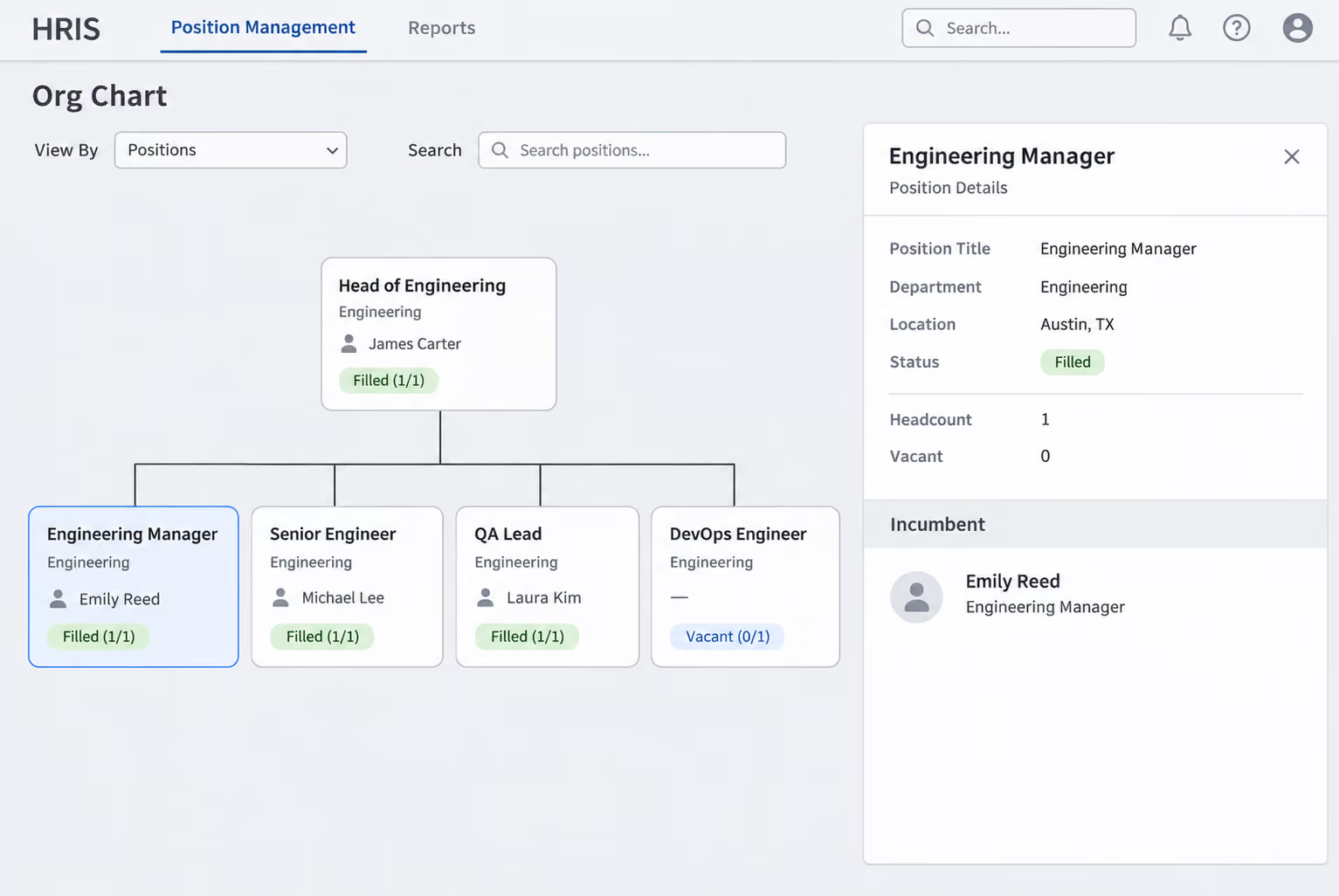
HRIS org chart using dummy data showing Head of Engineering James Carter at the top with filled status. Reporting positions include Engineering Manager Emily Reed, Senior Engineer Michael Lee, QA Lead Laura Kim, all filled, and DevOps Engineer which is vacant. Details panel for Engineering Manager shows title, department, location Austin TX, filled status, headcount 1, no vacancies, and incumbent Emily Reed.
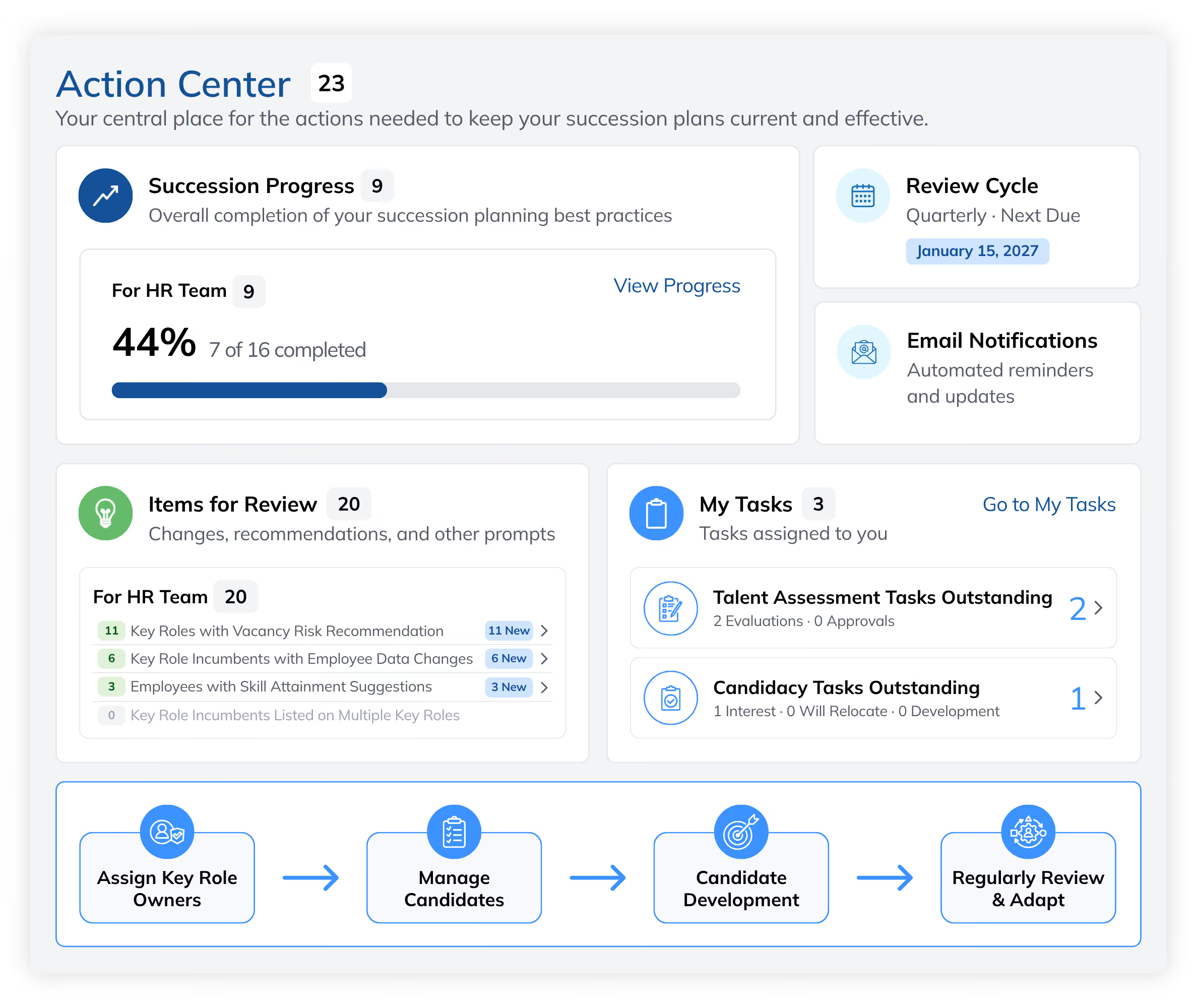
Action Center dashboard showing succession progress at 44% with 7 of 16 tasks completed for the HR team, items for review with 20 prompts including key roles with vacancy risk, key role incumbents with data changes, and skill attainment suggestions, a section for tasks assigned to the user with 3 tasks including talent and candidacy tasks outstanding, review cycle next due January 15, 2027, email notifications for reminders, and a workflow at the bottom with steps: assign key role owners, manage candidates, candidate development, and regularly review and adapt.
When Should You USE Succession Planning Software?

Leverage succession planning software when...

White checkmark symbol centered within a solid blue circle.

You need to identify your most critical roles. Determine which positions have the greatest impact on organizational continuity and require succession coverage.

White checkmark symbol centered within a solid blue circle.

You want to know who's ready to step in. Identify potential successors and assess their readiness for specific critical roles.

White checkmark symbol centered within a solid blue circle.

Leadership continuity is a priority. Understand where vacancies or unexpected departures could create significant organizational risk.

White checkmark symbol centered within a solid blue circle.

You want to uncover more internal talent. Use skills, competencies, performance-potential assessments, and talent insights to identify promising future leaders.

White checkmark symbol centered within a solid blue circle.

Development needs to support future roles. Create targeted development activities and measure whether candidates are becoming more prepared for critical positions.

White checkmark symbol centered within a solid blue circle.

Business leaders need to be involved. Give Key Role Owners responsibility for evaluating successors, overseeing development, and keeping succession plans current.

White checkmark symbol centered within a solid blue circle.

You need visibility into your leadership bench. Track successor coverage, readiness progression, internal mobility, and the impact of leadership development efforts.

Action Center dashboard showing succession progress at 44% with 7 of 16 tasks completed for the HR team, items for review with 20 prompts including key roles with vacancy risk, key role incumbents with data changes, and skill attainment suggestions, a section for tasks assigned to the user with 3 tasks including talent and candidacy tasks outstanding, review cycle next due January 15, 2027, email notifications for reminders, and a workflow at the bottom with steps: assign key role owners, manage candidates, candidate development, and regularly review and adapt.
ALIGNING WORKFORCE & LEADERSHIP NEEDS

When does it make sense to use both?

Position management and succession planning software work together to align organizational structure with future leadership needs. Position management defines the roles an organization requires, while succession planning identifies critical roles and prepares potential successors to fill them.

For example, during an expansion, position management software can help establish new positions and reporting structures. Succession planning builds on this by identifying which roles need succession coverage, assessing internal talent, and developing future leaders.

Together, these capabilities support more informed workforce decisions, internal mobility, and leadership continuity.
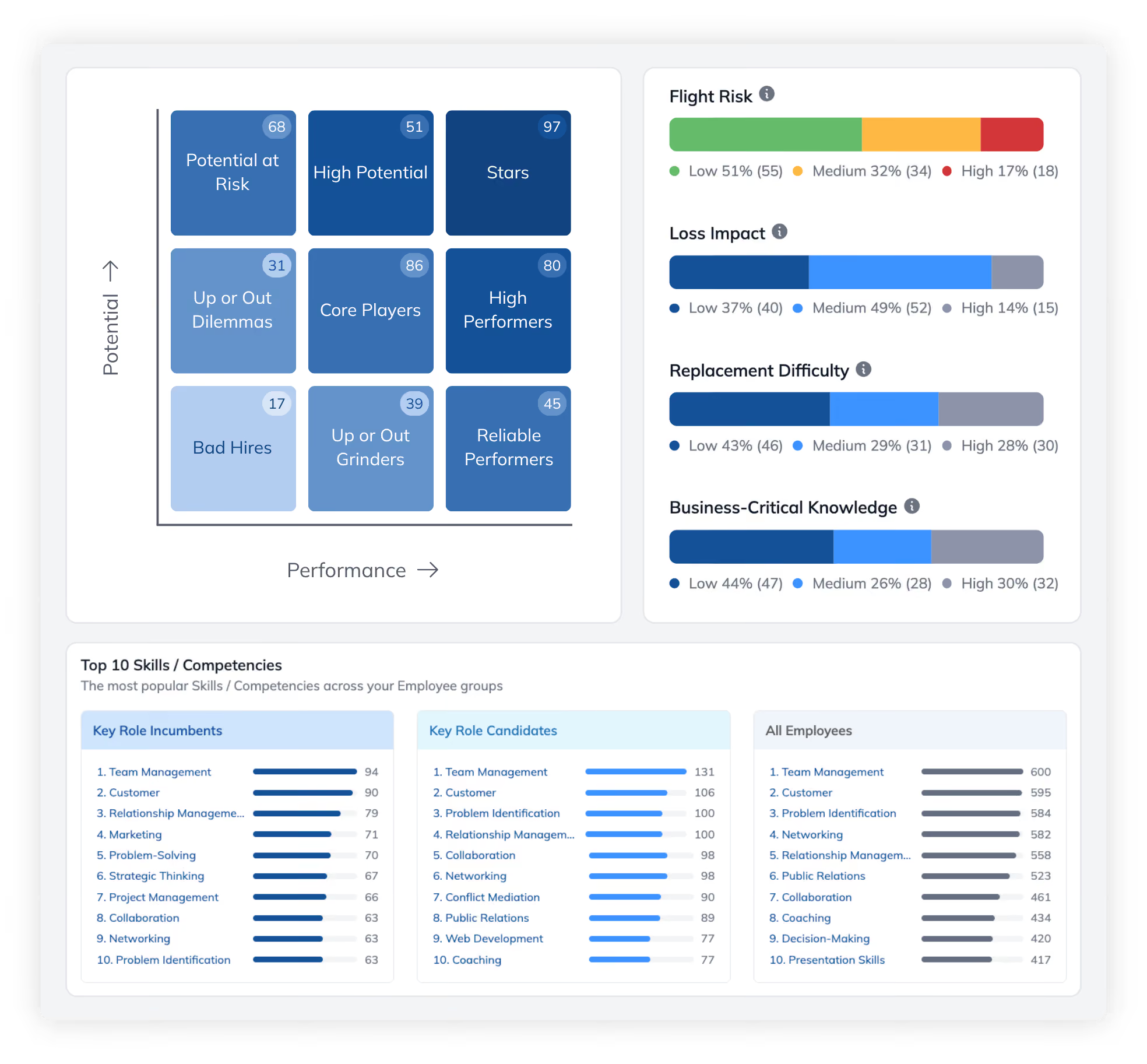
Dashboard displaying a 3x3 talent matrix categorizing employees by Potential (vertical axis) and Performance (horizontal axis) with segments named Potential at Risk, High Potential, Stars, Up or Out Dilemmas, Core Players, High Performers, Bad Hires, Up or Out Grinders, and Reliable Performers, each with numerical values. To the right, four horizontal bar charts show percentages for Flight Risk (Low 51%, Medium 32%, High 17%), Loss Impact (Low 37%, Medium 49%, High 14%), Replacement Difficulty (Low 43%, Medium 29%, High 28%), and Business-Critical Knowledge (Low 44%, Medium 26%, High 30%). Below is a section titled Top 10 Skills/Competencies with three columns listing key skills and their scores for Key Role Incumbents, Key Role Candidates, and All Employees, including Team Management, Customer, Problem Identification, and others, each with horizontal bars indicating popularity scores.
REDUCE LEADERSHIP RISK WITH SUCCESSIONHR

Purpose-Built for Succession.
Designed to Maximize Talent.

SuccessionHR is purpose-built succession planning software that helps organizations reduce leadership risk, maximize internal talent, and measure leadership development ROI.

Extended with talent intelligence, SuccessionHR connects critical roles with employee skills, potential, and successor readiness. From identifying leadership vulnerabilities to tracking development progress and measuring outcomes, the platform helps HR and business leaders build stronger leadership pipelines.

With supported HRIS integrations or the flexibility to operate independently, SuccessionHR complements your existing HR technology environment.
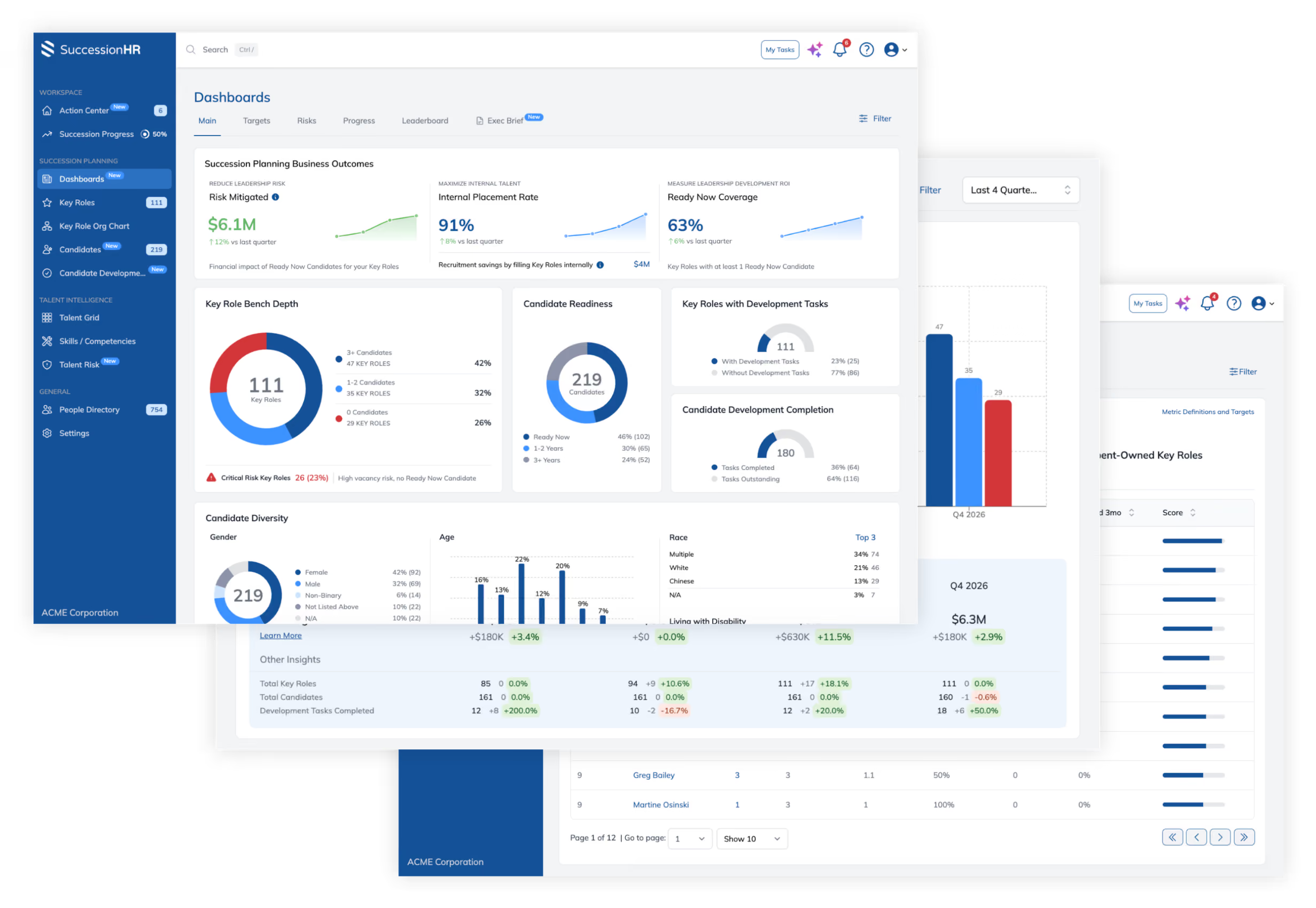
Dashboard interface of SuccessionHR showing Succession Planning Business Outcomes with metrics including Risk Mitigated at $6.1M, Internal Placement Rate at 91%, and Ready Now Coverage at 63%, along with charts for Key Role Bench Depth, Candidate Readiness with 219 candidates, Key Roles with Development Tasks, Candidate Diversity by Gender, Age, Race, and Living with Disability, and other insights about total key roles and development tasks completed.

Ready to strengthen leadership continuity?

See how SuccessionHR helps you identify critical roles, develop potential successors, and prepare future leaders for the positions that matter most.

Book a Demo